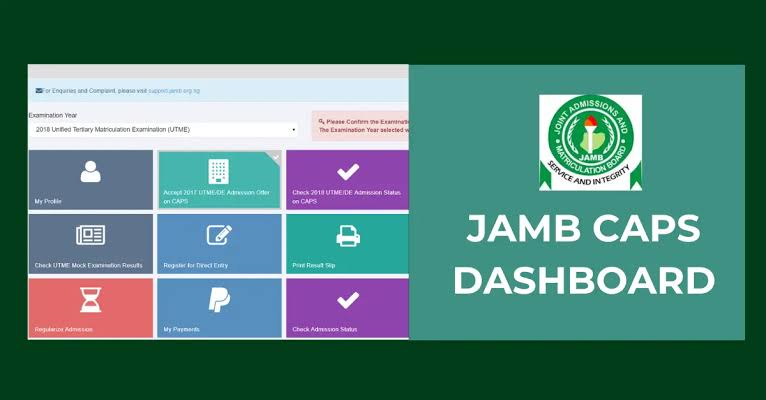
Now, you’ve written your UTME, seen your JAMB result, and now you’re waiting, refreshing your school’s website like a DJ on repeat. But wait—have you heard of JAMB CAPS?
That’s the magic door between you and your dream school. Think of it as the official handshake between JAMB and your chosen university. If you want to check your admission status, accept your offer, or know why your admission hasn’t shown yet, JAMB CAPS is your best friend (or worst enemy, depending on how patient you are).
But what is JAMB CAPS, really? How does it work? Why does it say “Not Admitted” when your friend already got in? And why in the name of all that is academic is the JAMB portal not opening on your phone?
Chill—we’re here to answer all that and more.
In this ultimate 2025 guide, you’ll discover:
- What JAMB CAPS is and why it matters,
- How to check your admission status on JAMB portal (step-by-step),
- How to accept admission like a boss,
- What all those weird messages mean (“Admission in progress”? Huh?),
- And how to fix those annoying CAPS issues.
Let’s get your admission sorted—one click at a time.
What Is JAMB CAPS and Why It Matters in 2025
Let’s break it down—JAMB CAPS stands for Joint Admissions and Matriculation Board Central Admission Processing System. Sounds like a mouthful, right? But don’t worry, it’s simpler than it sounds.
Think of CAPS as the digital control room where all Nigerian admissions decisions happen. Whether you’re aiming for UNILAG, FUTA, LASU, or any other institution, JAMB CAPS is where your admission status is officially processed, verified, and displayed.
Why Was JAMB CAPS Introduced?
Before CAPS came along, schools could sneak in students through the “back door”—yes, even goats got admission back then (just kidding… or not). But with CAPS, JAMB introduced transparency. Now, no one gets admitted unless JAMB says so. The system ensures:
- Merit-based admission (yes, your score matters!)
- No double admission (you can’t accept two offers),
- And real-time monitoring (you see changes instantly—if your CAPS is behaving).
Read Also: How to Apply for Change of Course on JAMB Portal in 2025
Why Should You Care in 2025?
If you:
- Want to check your admission status on JAMB portal,
- Hope to accept admission on JAMB CAPS, or
- Need to know why your status still says “Not Admitted”…
Then this platform is where the real gist is happening.
Without logging into JAMB CAPS portal, you’re practically locked out of the decision-making process. Whether you’re a UTME candidate, Direct Entry student, or just nosy about your future, you need to get comfortable with CAPS in 2025.
JAMB CAPS Login: How to Access the Portal
Okay, let’s get you through the front door of the JAMB CAPS portal—without stress, without shouting “this thing is not opening!”
First things first: you don’t need to go to a cyber café (unless you want to). With your phone, data, and a bit of patience, you can do this from your bed—literally.
Step-by-Step Guide to JAMB CAPS Login
- Go to the JAMB e-Facility portal:
https://efacility.jamb.gov.ng/
(Use Chrome browser if you’re on mobile.) - Log in with your JAMB email and password.
This is the email you used to register for JAMB. Don’t remember the password? Use the “forgot password” link to reset it. - Click on “Check Admission Status.”
- On the new page, you’ll see “Access my CAPS” on the left-hand menu. Click it!
- Welcome to CAPS! Now you can check admission status, accept or reject offers, and see your institution/course.
Having Trouble? Here’s Why JAMB CAPS Might Not Be Opening
If you’re stuck on a blank screen or CAPS isn’t loading, don’t panic. You’re not alone. Try these:
- Switch to desktop mode on your phone browser (especially on Chrome).
- Clear your browser cache or try a different browser.
- Avoid logging in at night when traffic is high. (Yeah, CAPS gets tired too.)
- If all else fails—use a laptop.
Pro tip: Always use the e-facility portal and never fall for fake “JAMB CAPS login” sites promising shortcuts.
How to Check Your Admission Status on JAMB CAPS
Now that you’re inside the JAMB CAPS portal, it’s time to check if the gods of admission have smiled upon you.
Here’s how to check your admission status on JAMB CAPS without confusion:
Step-by-Step: How to Check Your Admission Status
- Log in to the JAMB e-Facility Portal
(Reminder: efacility.jamb.gov.ng) - Click “Check Admission Status” on the dashboard.
- Tap “Access My CAPS” on the left-hand side.
- Select “Admission Status” from the CAPS options.
- You’ll see your institution, course, and one of the following messages:
What the Different Admission Status Messages Mean
- “Admitted”
Congratulations! You’ve been offered admission. Go ahead and accept it (we’ll show you how in the next section). - “Admission in Progress”
This means your school has recommended you, but JAMB hasn’t finalized it yet. It’s like a “we’re considering you” message—don’t panic! - “Not Admitted”
Oof. This one stings. But don’t give up! Schools release admission in batches. Keep checking. Today may not be your day, but tomorrow might be. - “You’ve been recommended for transfer to another program”
Your original course is full or unavailable, but the school is offering you another one. You’ll have to accept or reject the transfer before admission can proceed.
Can I Still Be Admitted If My CAPS Says “Not Admitted”?
Yes! Especially early in the admission season. Some candidates even get admitted after weeks of seeing “not admitted.” So, refresh responsibly—and don’t give up hope.
How to Accept or Reject Admission on JAMB CAPS
So… your admission status just changed to “Admitted.” Boom! The party’s in your head already. But hold up—before you start posting “admitted babe/guy” on WhatsApp, there’s one tiny but powerful step left: you must accept the admission on JAMB CAPS.
If you don’t, you might lose it. (And trust us, nobody wants to go from “admitted” to “not admitted” overnight.)
Steps to Accept Admission on JAMB CAPS
- Log into the JAMB CAPS section through the JAMB e-Facility portal.
- Click on “Admission Status”.
- If it says “Admitted,” two buttons will appear:
- Accept
- Reject
- Click “Accept” (unless you’re allergic to good news).
- You’ll see a success message confirming your action.
What If I Want to Reject the Admission?
Maybe the course isn’t what you applied for, or you’ve got eyes on another school (you sly genius). In that case:
- Click “Reject.”
- Be very sure, because once you reject, there’s no going back.
- JAMB will open the door for other schools to consider you for admission.
What Happens If I Don’t Click Anything?
Bad idea. If you ignore the offer and let the deadline pass, JAMB may withdraw the admission and offer it to someone else. Yikes.
Pro Tips
- Always check your school’s portal too. Some schools require you to accept admission there and on JAMB CAPS.
- After accepting, print your JAMB Admission Letter (you’ll need it for clearance and NYSC later).
Admission Status on JAMB Portal vs. CAPS: What’s the Difference?
Ah, the classic student dilemma:
“My admission is showing on the school portal, but not on CAPS. What’s going on?”
or
“JAMB CAPS says ‘Not Admitted,’ but the JAMB portal shows something else. Who should I believe?!”
Breathe. We’ve got you.
JAMB CAPS vs. JAMB Portal – What They Really Are
JAMB CAPS
- This is the real-time engine room for admission.
- It updates faster and shows exactly what JAMB has approved.
- It’s where you take action—accept or reject offers.
- If CAPS says “Admitted,” it’s official.
JAMB Portal (e-Facility)
- This is your dashboard—the home screen, if you like.
- You can register for JAMB, reprint slips, check UTME results, etc.
- It’s the entrance to CAPS, not the full story.
So Which One Should You Trust for Admission Status?
Always trust JAMB CAPS first.
That’s the platform that controls admissions. If your school posts an update before CAPS does, it simply means JAMB hasn’t uploaded it yet. Just give it time—it’ll sync up.
Common Scenario
School portal says “Congratulations,” but JAMB CAPS still says “Not Admitted”?
Relax. Your school has sent your name to JAMB, but CAPS is still updating. It can take days (sometimes weeks).
How to Be Sure:
- Keep checking CAPS every few days.
- Once your admission status changes to “Admitted” there, accept it.
- Then print your Admission Letter and throw that party (with receipts, of course).
Common Issues Students Face on CAPS (and How to Fix Them)
Let’s be real—JAMB CAPS can sometimes act like it skipped breakfast. It freezes, refuses to load, or keeps showing the same message for weeks. If you’ve ever wanted to throw your phone because CAPS said “Not Admitted” for the 10th day in a row, you’re not alone.
But hey, we’ve got solutions for all that drama. Let’s tackle the most common issues and how to fix them like a pro.
Issue 1: JAMB CAPS Not Changing
Symptoms:
- Still showing “Admission in Progress” for weeks
- Still says “Not Admitted” even after school portal congratulates you
Fixes:
- Be patient: Admissions roll out in batches. You might be in the next list.
- Refresh regularly: Log in every few days—not every five minutes. (Trust us.)
- Contact your school: They may have offered you admission that hasn’t synced with JAMB yet.
Issue 2: Admission in Progress—Forever!
If it feels like you’ve been stuck at “Admission in Progress” since January, don’t panic.
What it means: Your school has recommended you, and it’s being reviewed by JAMB.
What to do:
- Wait it out. This status often changes to “Admitted.”
- If it lingers for more than 2 weeks, contact your school’s admission office.
Issue 3: JAMB CAPS Not Opening
Common reasons:
- Browser issues (especially on mobile)
- CAPS not loading on some devices
- JAMB server traffic (yep, CAPS can get overwhelmed too)
Fixes:
- Use Google Chrome or Firefox
- Switch to Desktop Mode if you’re on a phone
- Try using a laptop or tablet if your phone refuses to cooperate
- Clear cache and cookies (your browser needs a little spring cleaning)
Issue 4: Blank CAPS Page
If you open CAPS and see nothing—no buttons, no text, just blankness—don’t scream.
Fix:
Switch your browser to Desktop Site mode. It works like magic on Chrome.
Issue 5: Transfer Alert on CAPS
Sometimes, CAPS tells you:
“You have been recommended for transfer to another programme.”
Translation: Your school wants to offer you a different course.
Fix:
- Click “Accept Transfer” if you’re okay with it.
- If you don’t accept, you won’t be admitted at all.
Pro Tip:
Always check both your school portal and JAMB CAPS. They don’t always update at the same time, but they eventually sync.
How to Know If a School Has Offered You Admission
Okay, here’s a question many students ask when they refresh CAPS and see “Not Admitted” for the hundredth time:
“How will I even know if a school has offered me admission?”
We get it. It’s like being in a relationship and not knowing if the other person is ready to commit. But don’t worry—we’ve got ways to catch them in the act.
Option 1: Check the School Portal
Many universities and polytechnics upload admission lists on their official school portals before JAMB updates CAPS.
What to do:
- Visit your school’s admission or student portal
- Log in with your JAMB Reg. Number or Application ID
- Look for an “Admission Status” section
If it says “Congratulations” there, your name has made it! Now all that’s left is for JAMB CAPS to reflect it.
Option 2: Keep Checking CAPS
After your school sends your name to JAMB, CAPS will update—eventually. This is where your official JAMB admission status appears.
Be patient (yes, again). Some schools send data in batches, so it might take a few days or weeks for CAPS to catch up.
Option 3: Contact the School’s Admission Office
You’d be surprised what you can learn just by calling or emailing the admission unit of your chosen institution. If you suspect something is off, ask:
“Has my name been sent to JAMB yet?”
If yes, you’ll know it’s just a matter of time before CAPS reflects it.
Bonus Clue: CAPS Transfer Recommendation
If CAPS says you’ve been recommended for a different programme, that’s a clear sign your school has processed something on your behalf.
Accept the transfer (if you’re okay with it), and your admission status will likely change to “Admitted” shortly after.
Quick Reminder: You cannot gain full admission into a tertiary institution in Nigeria without it reflecting on JAMB CAPS—so no matter what you see on the school portal, don’t forget to confirm it on CAPS and accept it there.
CAPS for Direct Entry & JUPEB Students
So, you didn’t write UTME because you’re entering via Direct Entry (DE) or JUPEB? Nice move! But guess what—you’re still part of the JAMB CAPS family.
That’s right, JAMB CAPS isn’t just for UTME folks. Whether you’re coming through JUPEB, ND, NCE, or IJMB, your admission status still goes through the same CAPS portal.
How Does CAPS Work for Direct Entry Candidates?
It works exactly like UTME. Here’s the process:
- You register for Direct Entry through JAMB.
- Your school processes your admission and forwards it to JAMB.
- JAMB verifies your documents and admission.
- You check CAPS to see your admission status.
- If admitted, you click Accept (or Reject, if you’re feeling bold).
How to Check Direct Entry or JUPEB Admission on CAPS
Same steps as before:
- Visit https://efacility.jamb.gov.ng/
- Log in with your registered email and password.
- Click “Check Admission Status”.
- Select “Access My CAPS”.
- Go to “Admission Status” to see if you’ve been offered admission.
Things to Note for DE & JUPEB Candidates
- Your admission may take longer to reflect on CAPS because verification of A’level results takes time.
- Be sure you uploaded your O’level and A’level results on the JAMB portal. If not, your CAPS may remain blank.
- If you get a transfer recommendation, treat it like gold. Accept it if it suits you—don’t ignore it!
Whether you’re coming in through UTME, DE, or a magic carpet, your academic journey must pass through JAMB CAPS. No shortcuts.
Conclusion: Your JAMB CAPS, Your Future
Here’s the truth: JAMB CAPS isn’t just another portal—it’s your admission lifeline. Whether you’re still seeing “Not Admitted”, stuck on “Admission in Progress”, or already dancing because it says “Admitted,” everything starts and ends with how you use this platform.
We’ve covered it all:
- What JAMB CAPS is and how it works,
- How to check your admission status on the JAMB portal,
- Steps to accept admission without making avoidable mistakes,
- Fixes for annoying issues like blank pages, delays, or CAPS not opening,
- And even what to do as a Direct Entry or JUPEB candidate.
Now, the ball is in your court.
Keep checking your JAMB CAPS portal.
Follow instructions carefully.
Accept or reject offers wisely.
And never forget: your admission isn’t complete until you’ve accepted it on CAPS.
So go ahead. Log in, click that button, and claim your seat at the table. Because the future? It starts with one little word: “Accepted.”
Frequently Asked Questions (FAQ) About JAMB CAPS
You’ve read the guide, clicked all the buttons, and refreshed CAPS more times than your WhatsApp status—but you still have questions. Don’t worry, you’re not alone.
Let’s clear up the most asked questions about JAMB CAPS 2025.
Why Is My JAMB CAPS Not Changing?
Because it’s shy. Just kidding.
In most cases, your school hasn’t forwarded your name to JAMB yet, or JAMB hasn’t approved it. Also, CAPS updates in batches—so wait a few more days, and keep checking.
Can JAMB CAPS Give Admission Without the School?
A: Nope. It’s teamwork. Your school proposes, and JAMB approves. If your school hasn’t recommended you, CAPS won’t show anything.
Why Is My CAPS Page Blank?
This one’s a classic. If you’re seeing a blank white screen:
- Switch your browser to Desktop Mode
- Use Google Chrome on mobile or laptop
- Try clearing your browser cache
Still blank? JAMB CAPS may be doing midnight maintenance. Try again later.
What Does “Admission in Progress” Mean?
It means your school has sent your name to JAMB and they’re reviewing it. You’re in the queue—just chill. It often changes to “Admitted” in a few days.
Can I Reject an Admission and Still Get Another One?
Yes, but it’s risky. Once you reject, JAMB will open you up to other offers—but there’s no guarantee you’ll get another one. So, reject only if you’re very sure.
Do I Need to Accept Admission on Both CAPS and School Portal?
Absolutely, yes.
- JAMB CAPS is for JAMB’s records.
- School portal is for clearance and registration.
Failing to accept on either can mess up your admission.
I Accepted Admission, Now What?
Time to print your JAMB Admission Letter and proceed to your school’s clearance and registration process. Welcome to campus life!
CAPS Shows I’ve Been Transferred to Another Course. Should I Accept?
If you’re okay with the course, accept it ASAP. If you don’t accept the transfer, you won’t be admitted at all, even if it was your dream school.